
This month there are two new ways to start an episode: give Fylom the sources yourself, or ask for one from the AI app you're already talking to.
Bring your own sources
Some of what you most need to get across isn't on the web, like lecture notes you need to know by Friday or a 40-page report at work. You can now give those to Fylom directly, and go over them on the walk in.

Attach up to five pieces of material in Create, 100,000 characters in all:
- A PDF. Reports, papers, slides exported as a document.
- A text or Markdown file.
- A link. Fylom reads the page itself, not a search result about it.
- Pasted text. Notes, a transcript, an email chain.
Then one line on what you want from it:
- "explain this like im new to it"
- "the arguments for and against, from this"
- "drill me on the parts ill be examined on"
Fylom treats your material as the authority on its subject. Before any web search, Fylom reads the request and everything you gave it, and decides whether the episode can be made from your material alone. Usually it can, and no search runs. When something is missing, it names the gap, runs one search for that gap only, and keeps what it finds separate from what you provided. It doesn't swap a claim from your material for one from the web.
Every episode built this way lists your material as a source, so you can see what it drew on. With nothing attached, the same composer researches the topic the way it always has. It's in Create on iOS, Android and the web.
Ask Claude or ChatGPT for an episode
You've spent an hour working something out with Claude or ChatGPT, and the answer is 2,000 words long. Ask for it as a Fylom episode from the same chat, and it's in your library a few minutes later, ready for the drive home.
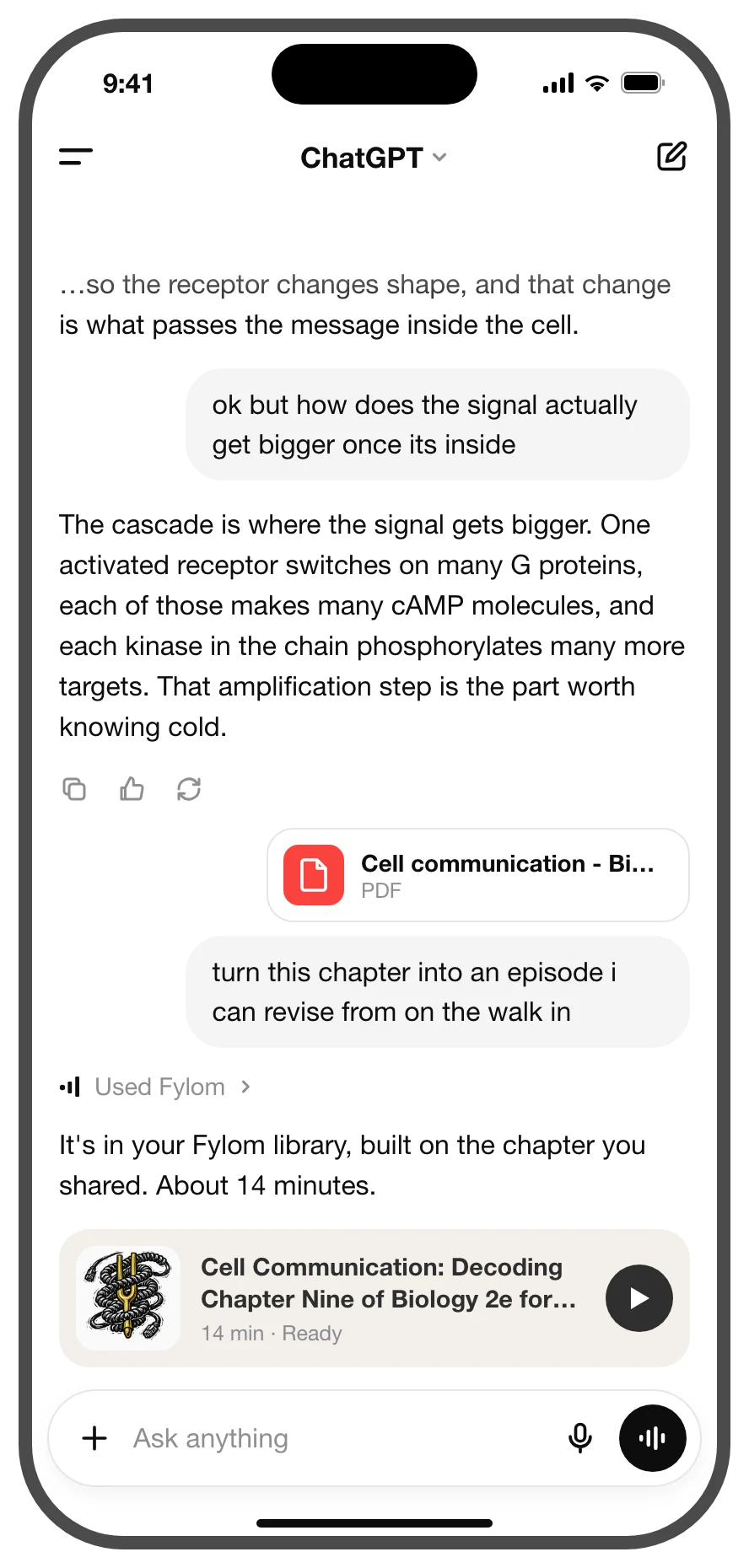
Fylom connects to your assistant as an MCP connector, which gives it four tools:
- Make an episode. From the conversation so far, a document you've shared in the chat, or a topic Fylom researches from scratch, with a length if you want one.
- Search episodes. By idea or by a phrase you remember, in your library or in the Fylom catalog. It points to the part of the episode that matched.
- Check on an episode. Status, and the link once it's ready.
- List your recent episodes, and whether you made each one or saved it from the catalog.
Fylom only gets what the assistant sends when it uses one of these tools, not the rest of the conversation. You sign in with your Fylom account, and the connector sees only your episodes. Disconnect it any time in Settings on the Fylom website.
To connect, add a custom connector in your AI app with this address and sign in to Fylom:
https://api.fylom.com/mcp
It works in Claude, ChatGPT, Claude Code and any app that lets you add a custom MCP connector. The next time a chat runs long, you can hear it on the drive home.
A tip: ask your assistant what to listen to
Your assistant usually knows something about what you're into. Once Fylom is connected, ask it to pick from the catalog and you have something for the commute without scrolling. It chooses from ready-made episodes, so there's nothing to wait for:
- "based on what you know im into, what fylom episodes should i listen to"
- "find me something on fylom for my commute, nothing about work"
- "anything on fylom like the history stuff we were talking about"